
A rhythmic click-click-click from your walking pad is one of the most annoying sounds in home fitness — regular enough to notice on every call, irregular enough to drive you slightly mad trying to locate. The good news: clicking is almost always mechanical and fixable, and the rhythm of the click itself is your best diagnostic clue. Here’s how to read it.
Quick Answer: Walking Pad Clicking Noise
| Question | Answer |
|---|---|
| What causes clicking? | The 6 usual suspects: roller bearings, drive belt slipping on pulleys, debris caught in the belt, a loose screw or shroud, the belt seam passing over rollers, or something stuck under the pad. |
| How do I find the source? | Listen for the rhythm: once per belt revolution = belt/seam/debris; faster = roller or drive belt; only underfoot = loose hardware under the deck. |
| Is clicking dangerous? | Usually just annoying — but stop and inspect if it’s loud, sudden, or joined by grinding, burning smells, or belt slipping. |
| Can I fix it myself? | Most causes, yes: clean, lubricate, tighten screws, re-center the belt. Bearing or drive-belt replacement may need support. |
Diagnose First: What the Rhythm Tells You
Before touching a screwdriver, run the pad at low speed with nothing on it and listen:
- One click per belt revolution (slow, steady, matches belt speed) → something on the belt itself: the belt seam passing over a roller, debris stuck in or under the belt, or a damaged belt spot.
- Faster clicking (several per second, speeding up with the belt) → a roller bearing or the motor drive belt — these spin faster than the walking belt.
- Clicking only when you step → loose hardware under the deck or a cracked shroud flexing under your weight.
- Clicking plus belt hesitation or slipping → drive belt slipping on its pulley, or the walking belt catching on something.
Mark a spot on the belt with tape and watch whether the click lines up with the mark passing the front roller. If it does, the problem is on the belt. If not, it’s in the rollers, drive system, or frame.
Cause 1: Debris Caught in or Under the Belt
The most common and easiest fix. A small stone, a piece of hard plastic, pet debris, or even a dried clump of dirt stuck to the belt’s underside clicks once every revolution as it passes over the rollers. Sperax’s own troubleshooting lists “foreign object” among the first causes of unusual noise for exactly this reason.
Fix:
- Unplug the pad.
- Slowly rotate the belt by hand and inspect the full loop — top surface, edges, and as much of the underside as you can see.
- Lift the belt edges and vacuum the deck underneath, front to back.
- Remove anything embedded; wipe the belt with a damp cloth.
- Plug in, run slowly, and confirm the click is gone.
Cause 2: The Belt Seam Passing Over the Rollers
Every walking belt has a splice seam where the loop is joined. On most pads it’s nearly invisible — but on some, the seam is slightly raised and makes a soft click or thump each time it rounds the front or rear roller. This is usually normal and harmless (see our full belt seam guide).
It becomes a problem worth fixing when the click is loud, the seam is visibly lifting, or the seam catches enough to make the belt hesitate. Check from underneath: the seam should look even from one side to the other. An uneven or separating seam means the belt is failing and needs replacement — no adjustment fixes a bad splice.
Cause 3: Worn Roller Bearings
The front and rear rollers spin on bearings, and a failing bearing clicks or ticks rhythmically — typically a dull, regular click that speeds up with belt speed. Bearing wear is more likely on older pads or ones that have run dry and hot for a long time.
How to confirm: unplug the pad, lift the belt, and spin each roller by hand. A healthy roller spins smoothly and silently. A gritty, notchy, or clicking roller has a bad bearing.
Fix: roller bearings on most walking pads aren’t user-serviceable — the fix is replacing the roller assembly. Contact the manufacturer for the part (have your model number ready) or check warranty coverage; premature bearing failure on a young pad is often covered. Continuing to run on a bad bearing chews up the belt and strains the motor, so don’t ignore it for months.
Cause 4: Motor Drive Belt Slipping on Its Pulleys
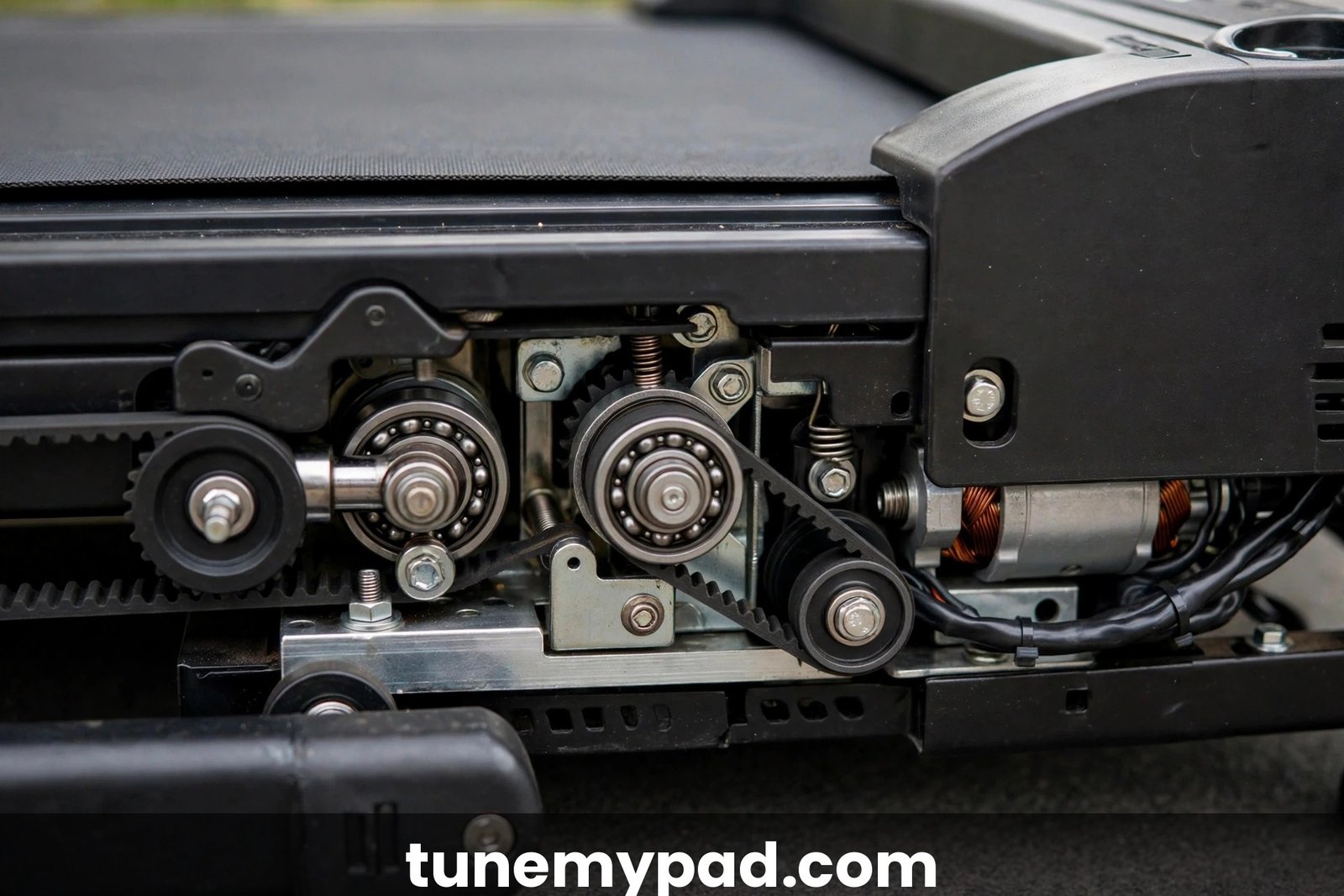
Inside the front shroud, a small toothed or ribbed drive belt connects the motor to the front roller. Sperax owners have reported this belt slipping or walking off its plastic pulleys, producing a clicking or slapping sound — sometimes joined by the walking belt hesitating underfoot, since power delivery becomes intermittent.
How to confirm: the click comes from the front of the pad (motor area), is faster than one-per-belt-revolution, and may come with brief belt slowdowns.
Fix:
- Unplug the pad and remove the motor cover (check your manual — usually a few screws).
- Inspect the drive belt: is it seated squarely on both pulleys? Cracked, glazed, or stretched?
- If it’s just slipped off, reseat it carefully. If it’s worn or stretched, it needs replacing — note the part number and contact support.
- While the cover is off, vacuum dust from the motor and board, check that pulley set-screws are snug, and refit the cover before powering on.
Don’t run the pad with the cover off beyond a brief diagnostic listen — the spinning pulleys are a finger hazard.
Cause 5: Loose Screws or a Loose Shroud
Vibration loosens hardware over time. A slightly loose end cap, side rail screw, or motor shroud can click or rattle — often only under your weight, when the frame flexes.
Fix:
- Unplug the pad.
- Go over every visible screw: end caps, side rails, motor cover, folding hinge bolts. Snug them firmly — but don’t overtighten plastic shroud screws, which crack.
- Check the folding mechanism latch (on foldable models) — a partially engaged latch clicks with each step.
- Run the pad and step on it to confirm.
This five-minute check solves a surprising share of “mystery clicks,” and it’s free.
Cause 6: Something Under the Pad
Not every click comes from the machine. A pad sitting on a small object — a pen, a cable, a floor transition strip — can click as the frame rocks microscopically with each step. Uneven flooring makes it worse.
Fix: lift the pad, clear and vacuum the floor underneath, and set it back down on a flat, hard surface. A treadmill mat under the pad both damps vibration and prevents this class of noise entirely.
Clicking Noise Diagnosis Cheat Sheet
| Click pattern | Most likely cause | First fix |
|---|---|---|
| Once per belt revolution | Belt seam, debris, or belt damage | Inspect belt, vacuum under it |
| Fast, speeds up with belt | Roller bearing or drive belt | Hand-spin rollers; check drive belt seating |
| Only when stepping on | Loose screws, shroud, or latch | Tighten all hardware |
| Click + belt hesitation | Drive belt slipping on pulley | Reseat or replace drive belt |
| Random / positional | Object under pad, uneven floor | Clear floor, use a mat |
Safety Stop-Points
- Unplug before any hands-on inspection. Fingers near rollers, belts, and pulleys with power connected is how injuries happen.
- Grinding, burning smell, smoke, or sparking alongside the click: unplug immediately and stop using the pad. That’s motor or electrical failure, not a maintenance issue.
- Loud banging or the belt grabbing: step off, kill power at the wall. Don’t try to “walk through” a mechanical failure.
- Don’t run the pad with the motor cover removed except for a brief diagnostic listen, and keep hands, hair, and clothing clear of the pulleys.
Walking Pad Clicking Noise FAQs
Why is my walking pad making a clicking noise when I walk on it?
The most common reasons are debris caught in the belt, the belt seam passing over the rollers, a loose screw or shroud flexing under your weight, or a worn roller bearing. Note whether the click matches belt speed (belt issue) or is faster (roller/drive-belt issue) — that narrows it down immediately.
Is it normal for a walking pad to click?
A very soft, once-per-revolution tick from the belt seam can be normal — all belts have a splice. Loud, sharp, or new clicking is not normal and deserves the diagnostic steps above. Any click that appeared suddenly was caused by something; find it.
Can a lack of lubrication cause clicking?
Indirectly, yes. A dry belt drags, runs hotter, and accelerates bearing and roller wear — the eventual failure often announces itself as clicking or grinding. If your pad clicks and it’s been months since lubrication, lubricate first; it’s the cheapest possible fix and overdue anyway.
My Sperax walking pad clicks — is this a known issue?
Sperax owners have reported drive-belt issues where the motor belt slips on its plastic pulleys, causing clicking and belt hesitation. Sperax’s own manual lists lubrication, loose components, and foreign objects as the noise checklist. If reseating doesn’t hold, contact Sperax support — see our Sperax troubleshooting guide for the support channels.
How much does it cost to fix a clicking roller bearing?
If it’s just debris or loose screws: free. A replacement roller assembly from the manufacturer typically runs $20–$60 plus shipping, and it’s usually a straightforward swap. If the pad is under warranty, the part (or the whole pad) may be covered — always check before buying parts.
Should I use WD-40 on a clicking walking pad?
No — never WD-40 on the belt or deck. If the click is friction-related, use 100% silicone oil. If it’s a bearing, no spray fixes a worn bearing; it needs replacement.
Conclusion
Clicking is your pad’s way of pointing at the problem: match the rhythm to the cause — belt-speed clicks mean belt, seam, or debris; faster clicks mean rollers or the drive belt; step-only clicks mean loose hardware. Most fixes are cleaning, lubrication, and tightening screws. If the click traces to a bad bearing or a worn drive belt, get the part from the manufacturer rather than running it into a bigger failure. Related: grinding noises, squeaking fixes, and the belt seam bump guide. External references: the Sperax walking pad user manual (unusual-noise troubleshooting: lubrication, loose components, foreign objects — via manuals.plus), and TreadmillDoctor’s belt diagnostics (checking belt seams from underneath for evenness).